Microsoft 365 BEC Investigation: A Practitioner's Guide
How to investigate business email compromise in Microsoft 365: which logs to pull, what to look for in each, how to tie actions to the attacker's session.
TL;DR. A Microsoft 365 business email compromise (BEC) is investigated from three exports: the Purview Unified Audit Log (what was done in the mailbox and files), the Entra ID sign-in logs, interactive and non-interactive (who signed in, from where, with which session), and the Entra ID audit logs (MFA methods, app consents, roles). The method is always the same: find the attacker's sign-in, pivot on its IP, Session ID and token, list every action carrying those identifiers, then check each persistence mechanism the attacker could have left. A password reset alone fixes none of it.
BEC is not a niche problem. The FBI's 2024 Internet Crime Report counts 21,442 BEC complaints and about $2.77 billion in reported losses for that year alone. In Microsoft 365 tenants the pattern I see most is not spectacular: a user enters a password on a convincing sign-in page, a few minutes later an inbox rule named "." starts moving invoices to RSS Feeds, and a week later a supplier's bank details "change". Everything needed to reconstruct that chain is in logs the tenant already has, provided they are exported before retention runs out.
What a BEC looks like in the logs
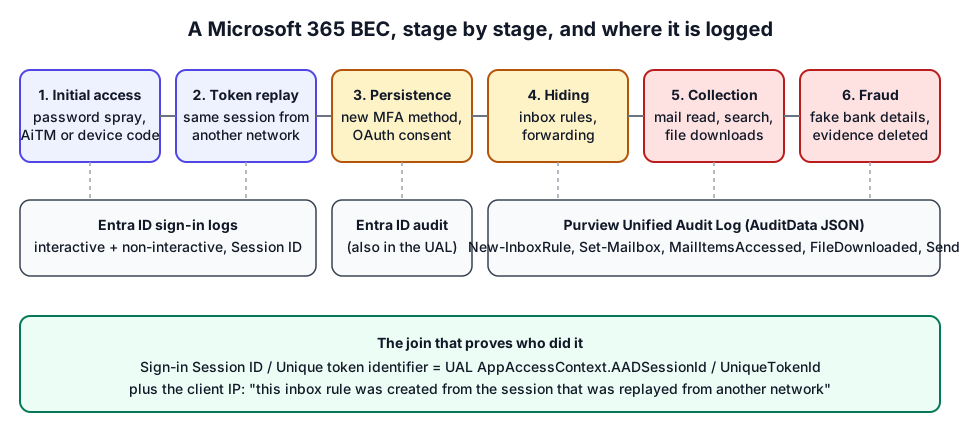
| Stage | What the attacker does | Where it shows | Key fields / operations |
|---|---|---|---|
| Initial access | Password spray, adversary-in-the-middle phishing, device code phishing | Entra sign-in logs | IP address, ASN, Authentication Protocol, error codes 50126 / 50074 |
| Session theft | Replays the stolen cookie or refresh token from their own network | Entra non-interactive sign-ins | Same Session ID, new IP / country |
| Persistence | Registers an MFA method, consents to an OAuth app, adds app secrets | Entra audit log (also UAL, workload AzureActiveDirectory) | User registered security info, Consent to application, Add service principal credentials |
| Hiding | Inbox rules that delete or move replies, mailbox forwarding | Unified Audit Log | New-InboxRule, Set-InboxRule, UpdateInboxRules, Set-Mailbox |
| Collection | Reads and syncs mail, searches for "invoice", downloads files | Unified Audit Log | MailItemsAccessed, SearchQueryInitiatedExchange, FileDownloaded |
| Fraud and cleanup | Sends the fake bank-details mail, deletes it | Unified Audit Log | Send, SoftDelete, HardDelete, MoveToDeletedItems |
MITRE ATT&CK names most of these: Email Hiding Rules (T1564.008), Email Forwarding Rule (T1114.003), Web Session Cookie (T1550.004), Steal Application Access Token (T1528).
Step 1: collect before retention eats the evidence
Retention is the first constraint, not the last. Entra ID keeps sign-in and audit logs for 7 days on the free tier and 30 days with P1/P2. The Unified Audit Log keeps 180 days by default for Audit (Standard). If the incident was reported three weeks late, the sign-ins that explain it may already be gone on a small tenant.
Export, on day one:
- The Unified Audit Log for the whole tenant (not only the victim) from at least 30 days before the first suspicious mail.
- Interactive and non-interactive user sign-ins from the Entra admin center. Token replay only appears in the non-interactive file.
- The Entra audit log, in JSON if you can: the CSV keeps a limited number of targets and modified properties.
The step-by-step, including row limits and PowerShell paging, is in how to export the Unified Audit Log and Entra sign-in logs. Keep the original files untouched and hash them; you will be asked what you analysed.
Step 2: find the attacker's sign-in
Start from what you know (a reported mail, a fraudulent payment, a user who "didn't do that") and walk back to the sign-in. In the sign-in logs, look for:
- Successful sign-ins from hosting or VPN networks (cloud providers, VPS hosts). AiTM kits and attackers rarely operate from a residential ISP.
- One Session ID seen from two networks. The interactive sign-in comes from the phishing proxy, then the non-interactive sign-ins of the same session come from somewhere else. This is the most reliable replay indicator; see AiTM phishing and token replay detection.
- Bursts of failures: password spray (one IP, many accounts, error 50126) or MFA prompts denied repeatedly followed by a success.
- Device code or legacy protocol sign-ins for users who never use them.
- Impossible travel, with care: VPNs and mobile networks produce plenty of false positives. Entra ID sign-in logs analysis covers how to tell them apart.
Write down, for each suspicious sign-in: time (UTC), IP, ASN, country, user agent, application, Session ID and Unique token identifier.
Step 3: pivot from the session to the actions
This is where a BEC investigation becomes evidence instead of suspicion. Microsoft carries the sign-in's identifiers into workload logs: in the Unified Audit Log, Exchange and SharePoint records hold AppAccessContext.AADSessionId and AppAccessContext.UniqueTokenId (Exchange also has SessionId). Microsoft calls these linkable identifiers and documents the mapping on Microsoft Learn.
Filter the UAL on those values and on the attacker's IPs, and you get the attacker's own actions, separated from the user's normal activity on the same mailbox. Then read them in order: inbox rules, forwarding, MFA changes, consents, searches, reads, downloads, sends, deletions. The Unified Audit Log investigation article lists the operations and the AuditData fields worth reading for each.
Two caveats. Not every record carries a session ID (some aggregated and background records don't), so keep the IP pivot as a fallback. And an IP pivot alone can mislead when the attacker used a shared VPN exit that a legitimate user also uses; the session match is stronger.
Step 4: check every persistence mechanism
Attackers expect a password reset. What survives it:
| Persistence | Evidence | Why a reset does not help |
|---|---|---|
| Stolen session / refresh token | Non-interactive sign-ins from the attacker's IP after the reset | Tokens stay valid until revoked or expired |
| Inbox rule forwarding outside | New-InboxRule with ForwardTo / RedirectTo | Mail keeps flowing out, no sign-in needed |
| Mailbox forwarding | Set-Mailbox with ForwardingSmtpAddress | Same |
| OAuth app consent | Consent to application, Add delegated permission grant | The app holds its own tokens (illicit consent grant) |
| Attacker's MFA method | User registered security info | The attacker passes MFA with their own device |
| Mailbox delegation | Add-MailboxPermission, Add-RecipientPermission | Access through another account |
| Privileged role, app secret, federation | Add member to role, Add service principal credentials, Set domain authentication | Tenant-level access, independent of the user |
Malicious inbox rules and forwarding goes deeper on the most common one.
Step 5: scope what was read and sent
Management will ask two questions: what did they read and who did they write to. The first is answered by MailItemsAccessed: Bind records list individual messages by InternetMessageId; Sync records mean a whole folder was downloaded by a client and should be treated as exposed. The second is answered by Send records from the attacker's session, message trace, and the victim's Sent Items and Recoverable Items. Keyword searches (SearchQueryInitiatedExchange) show what the attacker was hunting for, but only when that logging is enabled, which it is not by default according to CISA's expanded cloud logs playbook.
Step 6: build the timeline and the verdict
A good BEC report has a single UTC timeline from the first attacker sign-in to containment, with each line citing its record. It states the verdict with its reasons ("compromised: inbox rule forwarding outside created from a session replayed from another country"), what was exposed, and what was not checked. The gaps matter as much as the findings: no non-interactive sign-ins, no MailItemsAccessed, 7-day sign-in retention. Retention limits and missing logs lists the usual ones.
Doing this without a SIEM
Many BEC investigations happen in small tenants with no Sentinel workspace and no budget, on exports that do not fit in a spreadsheet. M365 Forensics runs the steps above in the browser: drop the UAL CSV and the Entra exports, and it parses both layers of the UAL (CSV columns and the AuditData JSON), links mailbox actions to suspicious sign-in sessions, and returns a Clean / Suspicious / Compromised verdict with the evidence rows, an incident timeline and a remediation checklist. Nothing is uploaded; the analyser is WebAssembly running on your machine. The step-by-step walkthrough shows each screen, and the fictional incident walkthrough shows what a real-looking result reads like.
It does not replace judgment. Heuristics point, they do not prove: a hosting-network sign-in may be your own VPN, and a forwarding rule may be legitimate. Confirm with the account owner.
After the investigation
Containment comes first when the verdict is "compromised": revoke sessions, remove persistence, stop payments. The order matters, and it is laid out in the first hour after a BEC. Microsoft's own guidance is in Respond to a compromised email account and the incident response playbooks.
Frequently asked questions
Which logs do I need to investigate a business email compromise in Microsoft 365?
Three sources: the Purview Unified Audit Log for mailbox, file and admin actions; the Entra ID sign-in logs (interactive and non-interactive) for who signed in from where; and the Entra ID audit logs for MFA methods, app consents, roles and federation changes.
Does resetting the password end a business email compromise?
No. Stolen session cookies and refresh tokens, OAuth consents, inbox rules, mailbox forwarding and attacker-registered MFA methods all survive a password change. Revoke sessions and remove each persistence item.
How far back should the investigation go?
Start at least 30 days before the first suspicious e-mail, and earlier if the logs allow it. Attackers often sign in days or weeks before they act, and the phishing that stole the session is usually well before the fraud.
Further reading
- Microsoft Learn: Respond to a compromised email account
- Microsoft Security blog: From cookie theft to BEC
- Glossary: business email compromise, Unified Audit Log, token replay
- The same approach for other identity providers: Google Workspace and Okta log forensics.