AiTM Phishing Detection: Finding Token Replay in Entra ID
How AiTM phishing steals Microsoft 365 sessions despite MFA, and how to detect the token replay in Entra ID sign-in logs and the Unified Audit Log.
TL;DR. In adversary-in-the-middle (AiTM) phishing, the victim signs in through the attacker's reverse proxy, which relays password and MFA to Microsoft and keeps the session cookie. The attacker then replays that session from their own machine. In the logs: an interactive sign-in from the proxy's network (often a hosting provider), then non-interactive sign-ins with the same Session ID from a different IP or country, then Unified Audit Log records whose AADSessionId matches. Contain with session revocation, not just a password reset; prevent with phishing-resistant MFA.
Microsoft described one AiTM campaign that attempted to target more than 10,000 organisations from September 2021, with attackers starting payment fraud as little as five minutes after stealing credentials and session. Since then the kits have become commodity. For an investigator the good news is that AiTM leaves a very specific trace, because the stolen session is used from two places.
How the attack works
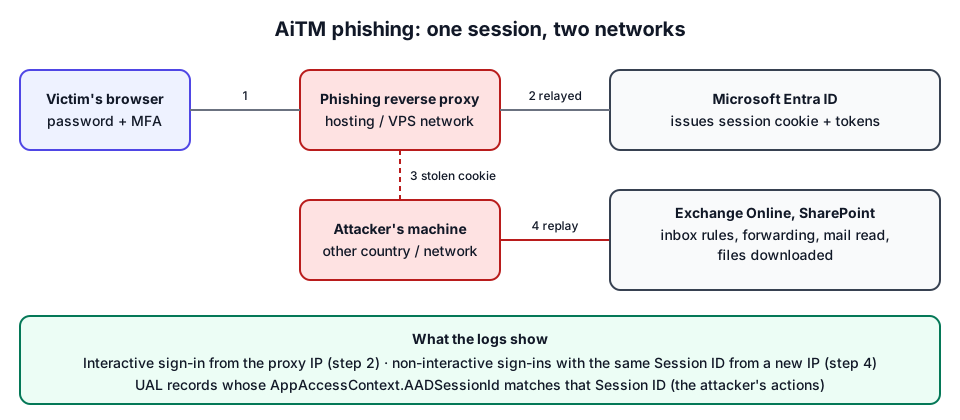
- The victim clicks a link to a page that proxies the real Microsoft sign-in.
- They type their password and approve MFA. The proxy forwards both to Entra ID, which issues a session cookie to the proxy, which passes a copy to the victim. From the victim's point of view the sign-in worked.
- The kit stores the cookie (and often the password).
- The attacker imports the cookie into their browser, or uses derived tokens, and accesses Outlook on the web, Exchange, SharePoint, without being asked for MFA again.
MITRE ATT&CK covers the steps as Adversary-in-the-Middle (T1557) and Use Alternate Authentication Material: Web Session Cookie (T1550.004).
What it looks like in the logs
| Moment | Log | What to see |
|---|---|---|
| Phishing sign-in | Entra interactive sign-ins | Successful sign-in, MFA satisfied, from the proxy's IP. Often a hosting / VPS ASN; application often OfficeHome |
| Replay | Entra non-interactive sign-ins | Same Session ID, different IP / ASN / country, minutes to hours later; user agent may change |
| Persistence | Entra audit / UAL | User registered security info (new Authenticator or phone), consents |
| Actions | UAL | New-InboxRule, Set-Mailbox, MailItemsAccessed, Send with AppAccessContext.AADSessionId = the stolen Session ID and ClientIP = the replay IP |
The key fact is that the session identifier is inherited by every token derived from the original sign-in (Microsoft Learn, linkable identifiers). A legitimate session moves between networks too (laptop from office to home), but a jump to another country or a hosting network within minutes of a hosting-network sign-in is hard to explain innocently.
Microsoft's June 2023 write-up of a multi-stage campaign describes exactly this sequence: the stolen cookie replayed hours later from an IP in another country, then a new MFA method added (with the note that adding a method did not require re-authentication by default), then inbox rules moving all incoming mail to Archive and marking it read (Microsoft Security blog).
A manual hunt, step by step
- Export both sign-in files (interactive and non-interactive) for the whole tenant, as far back as retention allows (export guide).
- Group by Session ID. For each session, note where it started: the IPs of its interactive sign-ins (or its first event).
- Flag sessions used from elsewhere: any successful sign-in of the session from an IP whose country or ASN differs from the origin's. Without country or ASN, a different /16 (IPv4) is a crude but useful proxy.
- Rank sessions whose origin is a hosting network and whose replay is abroad.
- Pivot to the UAL on the replay IPs and the Session ID, and list the actions (UAL investigation).
- Check other users for sign-ins from the same proxy or replay IPs: campaigns rarely stop at one mailbox.
If the tenant has Entra ID P2, the risk fields help: anomalousToken, unfamiliarFeatures, and the user-level Attacker in the Middle detection described on Microsoft Learn. Microsoft notes Anomalous token has a higher-than-normal false-positive rate at low and medium levels, so still verify from the raw logs.
False positives
| Situation | Why it looks like replay | What rules it out |
|---|---|---|
| Laptop moves between networks | Same session, new IP | Same country and residential/corporate ASN; same device ID and user agent |
| Split-tunnel VPN | Some traffic via VPN, some direct | VPN ASN known; alternation, not a one-way jump |
| Mobile handover (Wi-Fi to 4G) | New IP, carrier ASN | Mobile ASN in the user's country |
| IPv6 privacy addresses | Address changes constantly | Same /48 prefix |
How M365 Forensics detects it
The in-browser analyser implements this hunt as the "One session used from several locations (token replay)" finding (high): for each Session ID, the origin is its interactive sign-ins (or the first event), and any successful event of the same session from another IP whose country differs, or whose ASN differs when countries match or are unknown, or which falls in another /16 (/48 for IPv6) when nothing else is known, counts as replay. The finding lists Session opened from and Session used from.
Then the correlation step: every UAL or audit action carrying the replayed session, or the replay IP, or a token of a suspicious sign-in, is grouped under "Actions performed from the attacker's session or IP" (critical). Only sign-in findings that reflect the attacker's own sign-in are used as markers (hosting network, replayed session, device code, risky sign-in, MFA fatigue followed by success); impossible travel is not, because one of its two sign-ins is the user's. The fictional walkthrough shows the result on a sample AiTM case.
Containment and prevention
- Revoke sessions (Entra admin center → user → Revoke sessions, or
Revoke-MgUserSignInSession). This invalidates refresh tokens; access tokens can remain valid until they expire (one hour by default), unless the app supports Continuous Access Evaluation. - Remove what the attacker added: MFA methods, inbox rules and forwarding, app consents.
- Reset the password from a clean device.
- Prevent: phishing-resistant MFA (passkeys / FIDO2, Windows Hello for Business, certificate-based authentication), Conditional Access requiring compliant or hybrid-joined devices, and Token Protection where supported. Microsoft's token theft playbook covers the investigation and response steps in detail.
The full order of operations is in the first hour after a BEC.
Frequently asked questions
Does MFA stop AiTM phishing?
Not classic MFA (push, SMS, codes). The proxy relays the MFA step and steals the session cookie that proves it was completed. Phishing-resistant methods such as passkeys, FIDO2 security keys or Windows Hello for Business are bound to the real site and cannot be relayed this way.
Where does token replay show up in the logs?
In the Entra ID non-interactive sign-in logs: sign-ins with the same Session ID as the original interactive sign-in but from a different IP, network or country. Mailbox actions performed with the stolen session carry the same identifier in the Unified Audit Log.
Is a password reset enough after AiTM phishing?
No. Revoke the user's sessions and refresh tokens, remove any MFA method, inbox rule, forwarding or app consent the attacker added, then reset the password.
Further reading
- Microsoft Learn: Token theft playbook
- Glossary: token replay, non-interactive sign-in, linkable identifiers
- Entra ID sign-in logs analysis for the other sign-in patterns.